
YOUR PLATFORM
Windows
Windows 10 / 11 · x64
Download installer Or get the portable ZIPRequires WebView2. The installer can set it up for you.
Meet a calmer way to understand your storage.
Find what’s taking up space. Make room for what matters.
Free & open source · Windows, macOS & Linux
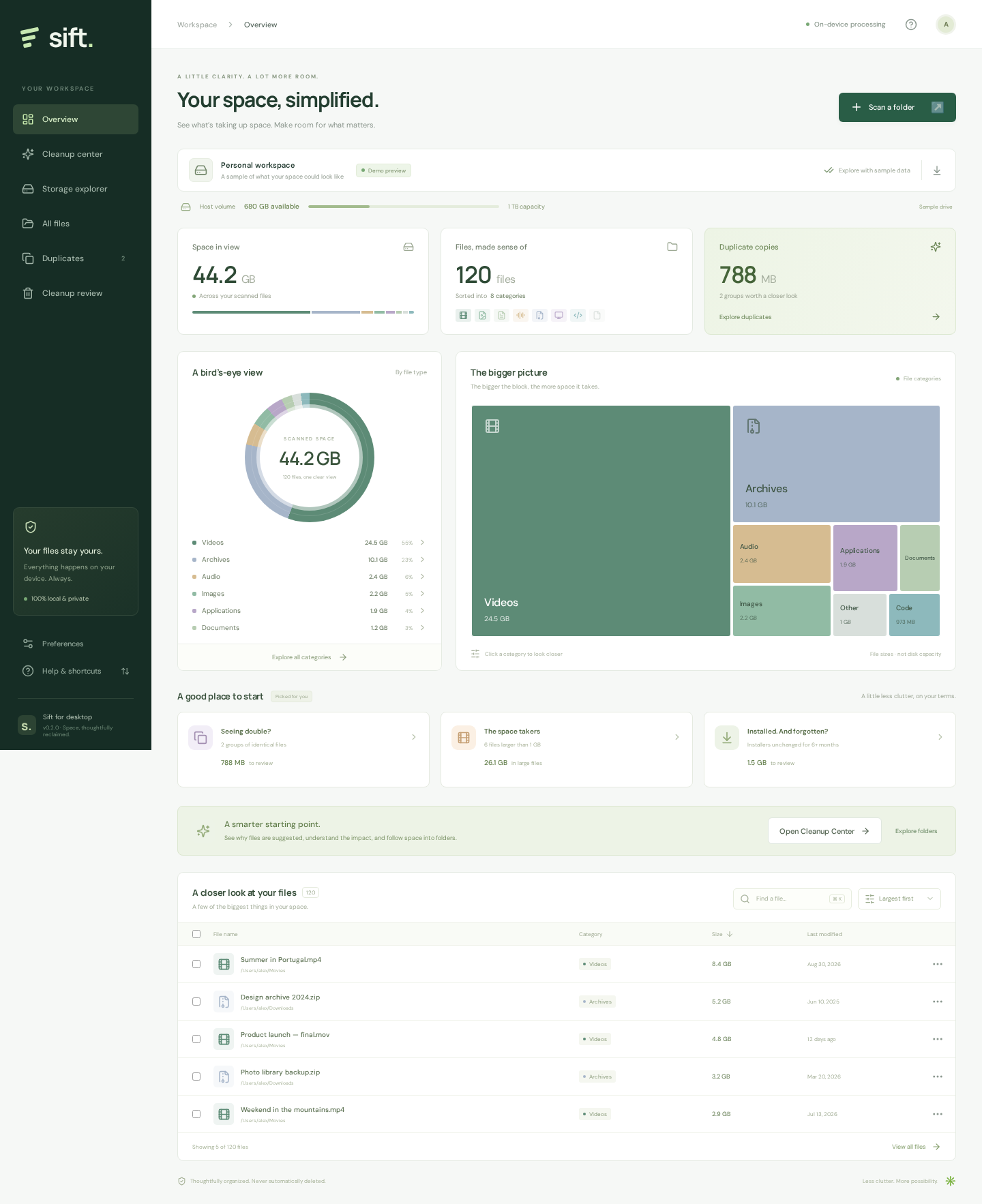
Your files stay on your device. Your decisions stay yours.Sample workspace shown
Local by design
Always review before removal
Built for your desktop
LESS GUESSWORK. MORE CLARITY.
From the big picture to the forgotten download,
every file has a place. Now you can see it.
A visual map turns a long list of files into something that makes sense. Explore by category, follow a folder, or put your biggest files first.
ACTUAL APP · SAMPLE DATAIllustrative example · You choose the copy to keep
THOUGHTFULLY BUILT. CAREFULLY CLEARED.
Your files are more than bytes. Sift gives you the context to decide what goes, and the control to keep what matters.
A FRESH START, IN THREE STEPS.
No account. No file uploads.
Just you, your files, and a little clarity.
Choose a folder or accessible drive. Sift scans in the background while your files stay on your computer.
Explore categories, spot large files, and compare exact duplicates. Understand the why behind each cleanup suggestion.
Review your selection and choose a cleanup action. Trash supports system restore; permanent actions require typed confirmation.
A LITTLE LESS CLUTTER STARTS HERE.
Your next fresh start is a download away.
Free, open source, and made for your desktop.
Windows 10 / 11 · x64
Download installer Or get the portable ZIPRequires WebView2. The installer can set it up for you.
Apple Silicon & Intel
Download for Mac Get the Intel Mac versionx64 · AppImage or Debian package
Download AppImage Or get the .deb packageMake the AppImage executable before opening. May require FUSE 2.
Preview builds are unsigned; macOS builds are not notarized.
See installation help before your first launch.
Yes. Sift is free and open source under the MIT license. There’s no account, subscription, or paid upgrade. You can inspect the code and help shape it on GitHub.
No. The desktop app scans and compares files locally. It doesn’t send your files or inventory to a server. Exporting a JSON inventory is optional, and that report contains file names and paths, so share it thoughtfully.
Select one file, several files, or all matches in a filtered view, then review their full paths. Recycle Bin / trash is the default and never falls back to deletion. You can explicitly choose permanent deletion or overwrite-and-delete by typing the action and file count. Overwrite verifies a logical zero pass; SSD/flash, snapshots, backups, and synced copies can retain data. Restore recycled files through your operating system’s trash; Sift cannot undo permanent actions.
This preview is unsigned, and macOS builds are not notarized. Download only from this site’s linked GitHub release and compare its SHA-256 checksum if needed. Windows may show SmartScreen; macOS may require approval in System Settings → Privacy & Security. Only proceed if you trust the source. See the platform prerequisites if a runtime is missing.
Open the Apple menu → About This Mac. If you see an Apple M-series chip (M1 or newer), choose Apple Silicon. If you see an Intel processor, choose Intel. Both downloads are DMG files.
Storage scanning and cleanup happen in the desktop app. This website introduces Sift and provides downloads. On first launch, the app shows a labeled sample workspace; choose Scan a folder to explore your own files.
Sift is an early release. Scans follow your current user permissions, skip symlinks, and stop at 500,000 files. Categories use file extensions; suggestions aren’t proof that a file is safe to remove. Read the current scope and limits for more detail. Mobile cleanup and automatic OS or browser-cache cleaning are not included.